
Skip to content

DigiTape

Two early digital tape algorithms in one free plugin.
Pulsar Audio Digitape

Digital Tape from the 2000s

Early tape plugins shaped the sound of the 2000s, bringing a distinctive character that today’s more accurate tape models don’t reproduce.

Developed when processing power was limited, these algorithms relied on clever design and the experience of engineers who knew tape machine inside out. DigiTape pays tribute to their work, bringing two complementary algorithms together in one free, low-CPU plugin.

■ Two distinctive early digital tape algorithms in one free plugin

■ Tape saturation, from subtle warmth to gritty distortion

■ Body, density and colour for drums, vocals and mixes

■ The distinctive character of 2000s tape plugins

Get DigiTape for Free

Get your license code directly in your mailbox by filling this 4-question survey.

Two modes. Two ways to saturate the top end.

Contour
Compress the highs. Round the transients.
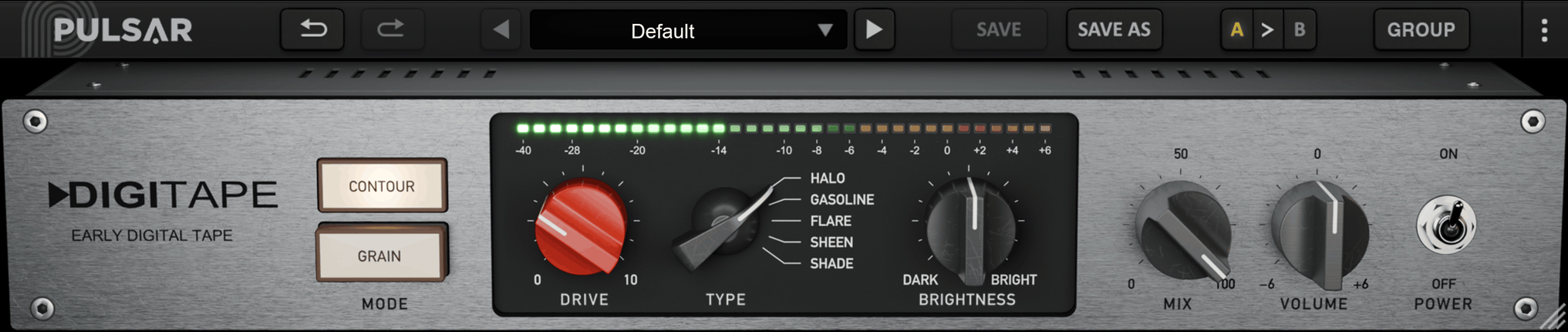
CONTOUR boosts the highs before saturation, making them saturate first. Filtering after saturation restores the tonal balance, leaving the top end compressed and the transients rounded. Choose from five Types, each with its own saturation curve and tonal balance. Use Drive, Brightness and Mix to shape the colour and the way the processing responds to your signal.
Acoustic Guitar
Grain
Saturate the lows and mids. Build new harmonics.
GRAIN splits the signal into three bands. The lows and mids are saturated, while the original highs are reduced. The harmonics generated by the lower bands enrich the top end, adding bite and texture. Drive and Brightness control the balance between that saturation and the original high frequencies.
Drum Bus

A tribute to the early DSP pioneers.

In the early days of digital audio, pro engineers struggled with limited computer power. Even the fastest machines needed expensive DSP cards to do what an entry-level laptop can handle today.

Tape presented a particularly difficult challenge. A detailed simulation could involve the recording electronics, the nonlinear magnetic response of the tape, the playback system and the interactions with an ultrasonic bias signal. Simulating this requires substantial processing power, especially when the aim is to put tape saturation on every track!

The developers who tackled this challenge were true pioneers, combining technical ingenuity with exceptional ears. Among them were recording engineers with decades of experience mixing on tape. They found inventive ways to capture the feel of machines they knew intimately, using their ears and musical judgment to decide what to preserve, what to simplify, and where to spend the precious processing power available. Those decisions gave their algorithms a character of their own.

DigiTape celebrates that approach and the pioneers behind it. Its two modes revisit their ideas, and the distinctive digital sound they created.

Explore the features

Move your cursor over the dots hotspot-dots to reveal DigiTape features
Pulsar Audio Digitape

A Footprint on pop culture

Early digital tape algorithms found their way into hit records and marked the sound of an area.

Jay-Z - Bringing guitars and samples together

On “Run This Town,” Young Guru used Massey TapeHead to help the guitars blend with a sample taken from vinyl. Giving those guitars a tape-like character helped the newly recorded parts sit naturally alongside the sampled record. Read Young Guru’s account in Sound On Sound.

OneRepublic - Giving a chorus more body

On “Stop and Stare,” Joe Zook used Crane Song Phoenix Luminescent on Drew Brown’s electric guitar in the chorus. Its contribution was specific and musical: bringing out the guitar’s lower midrange and overtones to give it a fuller sound. Read Joe Zook’s account in Sound On Sound.

Michael Brauer - Making tape character a starting point

For Michael Brauer, Phoenix II became a default choice when tracks hadn’t originally been recorded on tape. His preferred combination of Luster and Sapphire reflects how these early algorithms became familiar colors in a mixer’s palette - settings worth returning to, session after session. Read Michael Brauer’s interview on Gearspace.

Listen in action

Bass Synth
808 Loop
Bass in context
Acoustic Guitar
Drum Bus
Rock Mix

Videos

Get DigiTape for free

CPU
Memory
Operating System
GPU
Monitor
CPU
Memory
Operating System
GPU
Monitor
Compatible plugin formats
AAX

AAX Native
 64 bits only

Audio Unit

Audio Unit
64 bits only

vst2

VST 2.4
64 bits only

vst3

VST 3
 64 bits only

Downloads

Our software is protected with PACE Anti-Piracy, so you will need an iLok account to use it. On Windows, our installers will automatically install the iLok License Manager on your computer. You can find additional information and support on the PACE iLok website.