How To Shape The Sidechain Detector of The IPA 25
- Posted on

Why Harmonic Profiles Matter in Compression
In every compressor, the sidechain is the circuit that decides when and how much gain reduction happens.
The audio you hear flows through the main path, while a duplicate feeds the detector.
And by shaping that detector feed, you control not only the amount of compression but also why & how it reacts.
Punch: Classic Curves, Modern Context
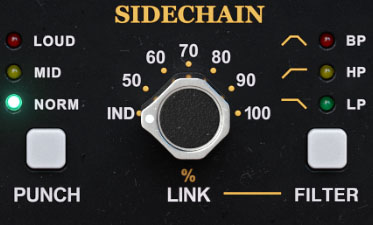
IPA 25 includes Punch, a three-mode selector that shapes how the detector responds to different parts of the spectrum — a direct nod to the original hardware.
- NORM – Flat sidechain. Standard compression where all frequencies are treated equally.
- MID – A subtle high-frequency emphasis. Great for general leveling, keeping the low end steady while letting snares, vocals, and other midrange elements guide the action.
- LOUD – Strong high-frequency emphasis. Bass energy no longer dominates the detector, so compression locks onto bright transients. Perfect for mix bus use when you want punch and forwardness without the kick pulling the whole mix down.
Why does this matter?
There’s a long-standing idea in mixing that the “ideal” spectrum of a balanced track resembles pink noise: a smooth downward slope of about –3 dB per octave. LOUD Punch mode flips that, introducing an upward slope of about +3 dB in the detector.
The result is that compression reacts in a way that nudges the mix toward that pink-noise balance – tighter, clearer, and more consistent across playback systems.
It’s not a shortcut to a perfect mix, but it’s a big part of why the original hardware earned its reputation for sounding so alive and so punchy.
Beyond Punch: Total Detector Control
The original hardware gave you three fixed Punch modes. IPA 25 goes much further – it turns the sidechain from a hidden circuit into a tool you can shape.
Now you decide not just how much compression happens, but precisely which parts of the music are in the driver’s seat.
EQ, External Keys, and Smarter Control
- Internal or External Input – choose whether the detector listens to the processed signal or a key source, for sidechain tricks like ducking or rhythmic pumping.
- Four-Band EQ – bell, shelf, HPF, LPF, with variable Q and slopes. You’re no longer stuck with fixed punch modes – shape the detector precisely so subs don’t choke the mix and vocals stay upfront.
Stereo Link & Shape: Control Width, Balance, and Feel
Most compressors give you a single “stereo link” switch.
The original hardware – and IPA 25 by extension – goes much further. You can decide how much the channels share gain reduction, and choose whether this sharing applies mainly to sustained levels or to fast transient events.
Link Amount
The LINK control sets how much detector information is blended between channels:
- 100% → both channels follow the same gain reduction. When a sound in one channel triggers compression, the same gain reduction is applied to the other channel too, even if its content wouldn’t have triggered compression. Preserves stereo balance — ideal on a master bus..
- 50–70% → partial linking. Each side reacts a little on its own, slightly evening out differences in dynamics between the channels, while adding subtle width and movement.
- 0% (Independent) → fully dual-mono. Each channel compresses only itself.
In L/R mode it can be useful for creative widening or in scenarios where a loud uncentered element needs to be tamed, but could make the stereo image unstable on a mix bus.
In M/S mode, it enables to compress independently the mids and sides, without shifting the stereo image. For example the ambience and reverb in the sides can be compressed freely and independently from the vocal and kick in the center.
Link Filter
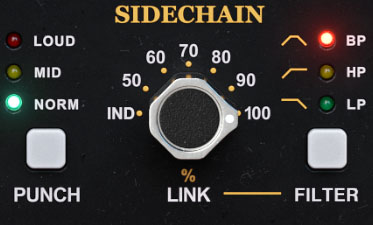
IPA 25 takes stereo linking further by allowing you to filter how gain reduction is shared between the two channels. You can choose whether the linking applies all the time, only to sustained gain reduction, only to fast transients, or to intermediate ranges:
- No filter (default) → the Link amount set by the knob applies continuously to all gain reduction.
- High-Pass (HP) → linking applies mostly to transient gain reduction. Fast changes on one channel, such as those caused by percussive elements and fast attack/release settings, are mirrored on the other channel, while sustained gain reduction is not affected.
- Low-Pass (LP) → linking applies mainly to sustained gain reduction. If one channel triggers a stable gain reduction (lasting several hundred milliseconds or more), this reduction is mirrored on the other channel. Conversely the linking is much reduced on transients.
- Band-Pass (BP) → linking applies to mid-range gain reduction events, between fast transients and long sustained levels.
Example
To illustrate how the Link section of IPA 25 works, we set up a test track containing three elements:
- a sine wave plus a drum bus, both fully panned to the left,
- and some low-level noise, fully panned to the right.
We then applied IPA 25 with fast attack and release settings.
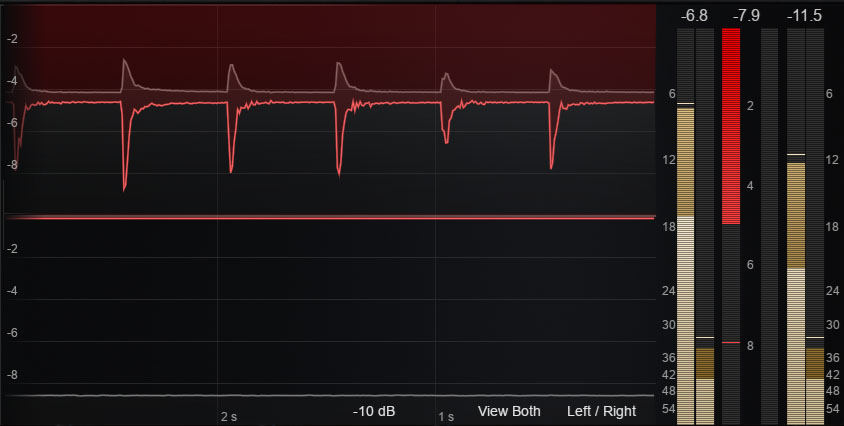
Link 0% → Gain reduction is applied only on the left channel, driven by the sine wave and drums. The noise on the right is too quiet to trigger compression, so no gain reduction occurs there.
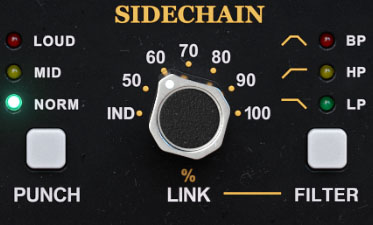
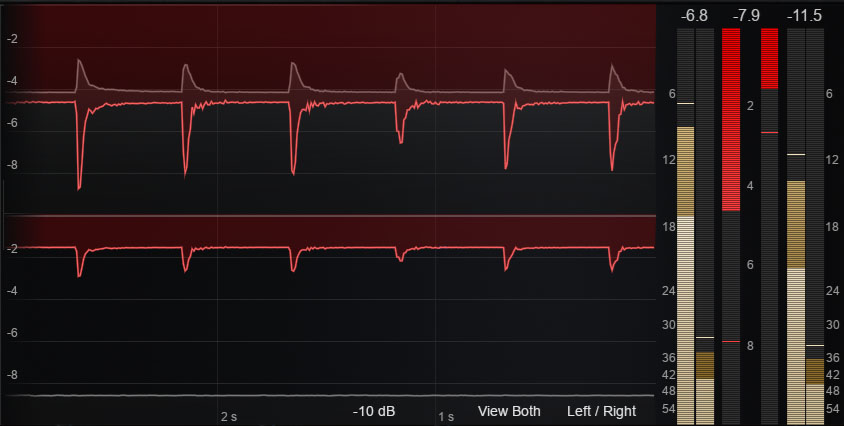
Link 60% → Even though the right channel is too quiet to trigger compression on its own, part of the gain reduction from the left channel is carried over to the right.
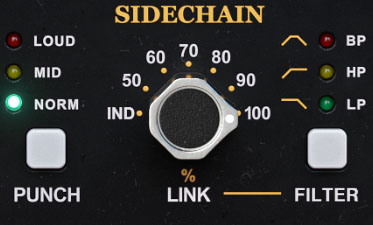
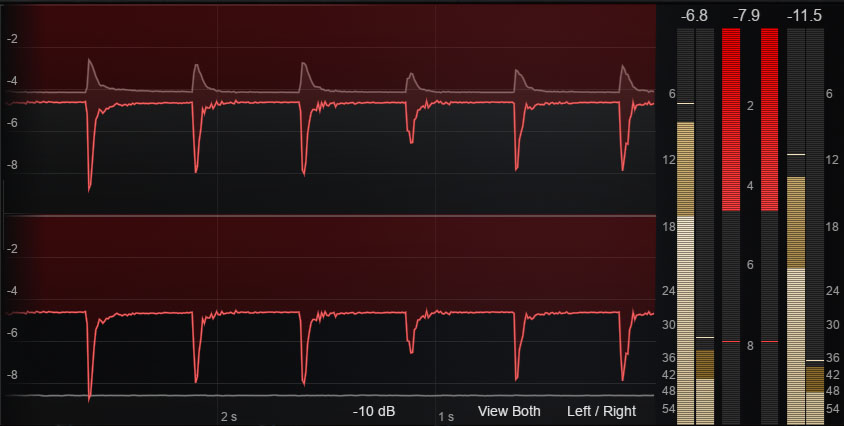
Link 100% → All gain reduction from the left channel is fully mirrored to the right.
Now, with the Link amount fixed at 100%, let’s look at the effect of the Link Filter:
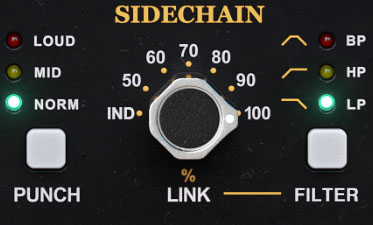
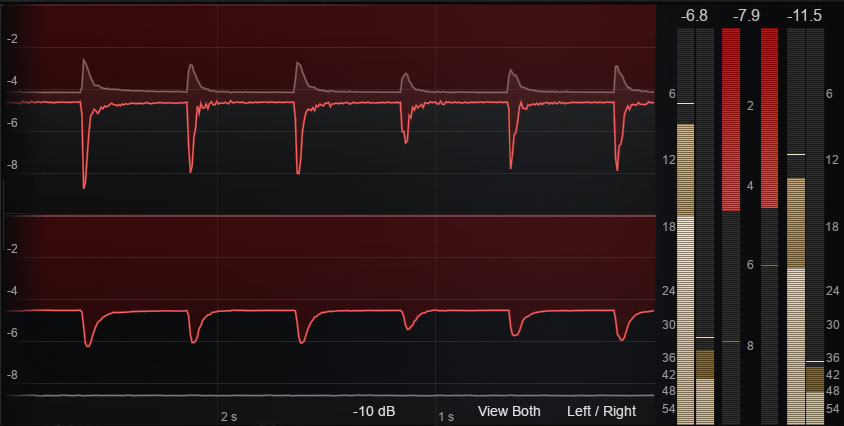
Link 100% + LP → The low-pass filter removes the fast variations in the linked gain reduction. The left channel is unchanged, while on the right channel the sustained reduction is preserved, but the drum-related peaks are smoothed and reduced.
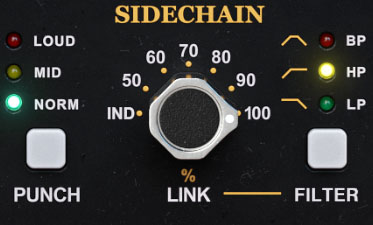
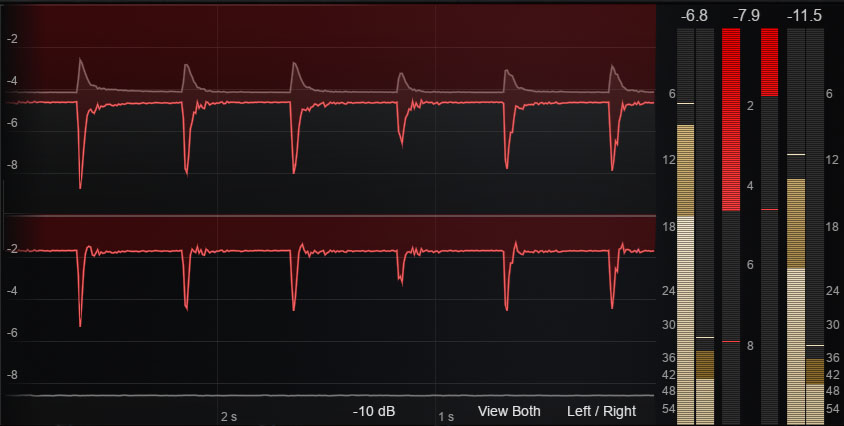
Link 100% + HP → The high-pass filter removes the sustained component of the linked gain reduction. The left channel remains unchanged, but on the right channel the long, steady gain reduction is reduced, while the fast transient peaks are still fully mirrored.
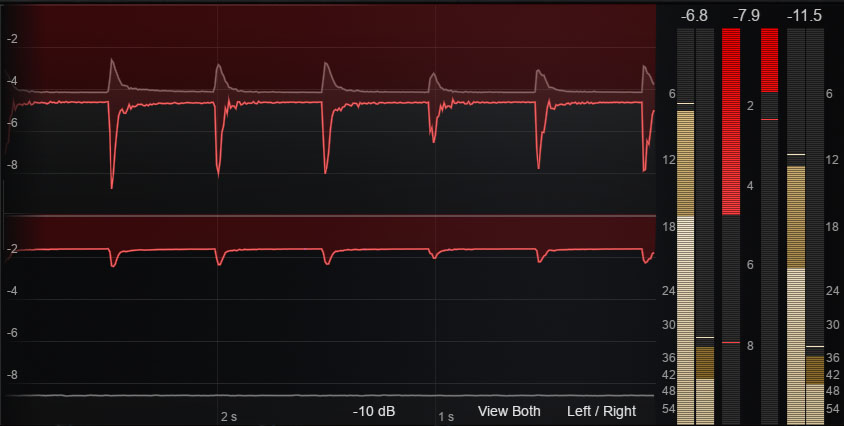
Link 100% + BP → The band-pass filter combines both behaviors. On the right channel, gain reduction is reduced for both sustained and transient parts. Only gain reduction with a medium rate of change—neither too fast nor too slow—would remain unaffected.
Look-ahead / look-behind
The Look setting in IPA 25 allows you to shift the sidechain signal in time, either backward (look-ahead) or forward (look-behind).
With look-ahead, the compressor anticipates incoming transients, reducing gain right as they hit — perfect for catching sharp drum attacks without letting them poke through.
With look-behind, the gain reduction lags slightly behind the input, which can create smoother, more natural compression on material where preserving the transient edge is desirable.
This behavior is clearly visible in the curve display, where the look setting controls the delay between the input volume envelope and the resulting gain reduction.
Hear It In Action
The following example demonstrates the sidechain delay feature of the IPA 25 (look-ahead or look-behind) on a drum bus. Pay attention to how the attacks of the drums are affected — either caught more precisely with look-ahead, or allowed to punch through with look-behind.
This example shows IPA 25 used for ducking a bass with a kick drum, first without look-ahead, where the kick attack slips through, and then with look-ahead, where the bass is pulled down right on time with the kick.
Compression That Follows the Music
Most compressors treat the sidechain as an afterthought – maybe a simple high-pass filter, nothing more. IPA 25 makes it a core creative tool.
- With Punch, you choose how the detector emphasizes highs, so compression responds to snares and vocals instead of being dragged around by bass.
- With the 4-band EQ, you sculpt the detector feed precisely, deciding which instruments steer the dynamics.
- With Link and Filter, you control not just how much channels interact, but when they should interact and when they shouldn’t – keeping the stereo field wide, stable, and musical.
Instead of compression dictating the music, IPA 25 lets the music dictate the compression. That’s the difference between just controlling level and shaping the feel of an entire mix.
👉 Drop it on your mix bus or drum bus and hear how quickly the detector changes the character of the groove.